
RaceMe Tuner Error Code 14101Updated 4 months ago
Error Code 14101 Here is what to do if you have this error code
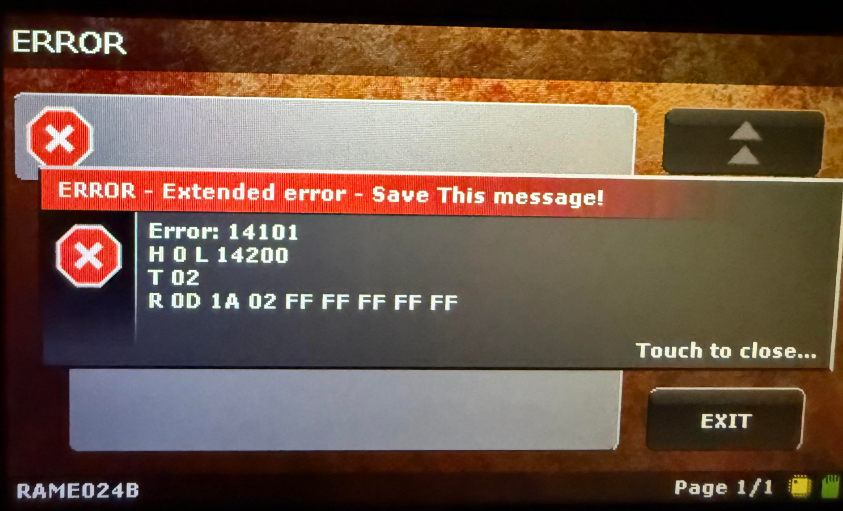
If the Recovery programming stops with ERROR 14101 / R 0D 1A 02 FF FF FF FF FF:
On some NEW 2019-2021 ECMs that do not have an OEM flash on them, the Ultra may display an error 14101 when attempting to write the recovery file.
If error 14101 is displayed on the Ultra, please follow the instructions below.
Step 1 :
Key On, Engine Off, Tuner powered up –
Go to: Main Menu > Settings > Service Codes – Enter code 6625
ENTER
The Ultra must display the message: ECM’s BL Data Read!
IF THE ISSUE STILL PERSISTS Follow Step 2:
If the error 14101 keeps occurring while trying to program the recovery file to the ECM, follow these instructions in order.
Disconnect both negative battery cables.
Open the Ultra SD Card on your computer.
Open the Custom folder, then open the ECM folder.
Save all .ecm files to your computer.
Open the RTG folder, then save all .rtg files to your computer.
Open the DATA folder of the SD card, save only the recovery.rmn file to your computer.
Update the SD card following these instructions
Re-install the .ecm and .rtg files you saved to your computer previously to the ECM and RTG folders, located in the Custom folder of the sd card. (Drag and drop/ or copy and paste the files)
Re-install the recovery.rmn file you saved previously to the DATA folder of the SD card. (Drag and drop/ or copy and paste the file)
Re-connect the battery cables and connect to a battery charger, charge the batteries while programming.
Insert the SD card into the monitor, connect the Ultra OBDII cable to port below the dash.
Turn Key to RUN position, press start button twice.
Agree to disclaimer if any, on the Ultra.
Main Menu > Settings > SCT Internal Test – if the Ultra is successful or if it errors, continue with instructions.
Main Menu > Settings > Service Codes > 6625 ENTER – if the Ultra is successful or if it errors, continue with instructions.
Main Menu > ECM Tuning > Write Recovery to ECM > Follow prompts.
Once recovery is written successfully, continue to program the Custom Tune File – Main Menu > ECM Tuning > ECM > Program Custom File
If you followed these steps and are still experiencing an issues or the error code is still active please Fill out this form here : https://thedieseldudes.com/pages/ticket and let us know if you have already tried these steps so we can provide you with a quicker response.